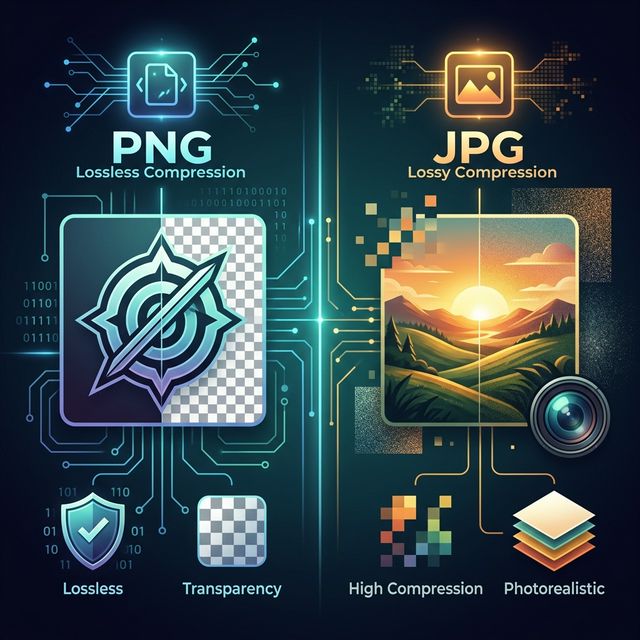
In the expansive world of digital media, few debates are as enduring as the rivalry between **PNG** and **JPG**. If you've ever uploaded a photo to a website, designed a business card, or shared a meme, you have interacted with these two titans. They are the "English and Spanish" of the digital image world—everyone uses them, but they serve different regions and purposes. Choosing the wrong format isn't just a minor technicality; it’s a decision that can lead to blurry text, broken designs, and websites that crawl at a snail's pace.
In this definitive 1500+ word technical showdown, we will go far beyond the surface. We'll explore the mathematical foundations of both formats, analyze their performance in modern web ecosystems, and provide you with a decision matrix that will ensure you never pick the wrong format again. Whether you are using 3esk Converter to shrink a library or preparing a masterpiece for print, this guide is your roadmap.
1. What is JPG (Joint Photographic Experts Group)?
Born in 1992, JPG (or JPEG) was designed with a single, massive goal: to make photography portable. Before JPG, high-resolution photos were far too large for the early consumer hard drives and slow dial-up modems. JPG changed the world by introducing **Lossy Compression**.
The Science of the Sacrificed Pixel
JPG works by using a process called Discrete Cosine Transform (DCT). Essentially, it breaks an image into 8x8 pixel blocks and then uses complex calculus to "summarize" the color information. It identifies patterns that the human eye isn't very sensitive to—such as subtle variations in brightness in a blue sky—and deletes that data. Once this information is thrown away, it is gone forever. This is why JPG is called "lossy."
Why We Love JPG (The Pros):
- Unrivaled File Sizes: A 10MB photo can often be compressed to 800KB with no visible quality loss.
- Global Standard: From the cheapest flip phone to the most expensive DSLR, everything speaks JPG.
- Adjustable Quality: You can decide the balance between size and beauty (typically 0-100 scale).
2. What is PNG (Portable Network Graphics)?
PNG was developed in the mid-90s as a superior, patent-free alternative to the GIF format. While JPG was built for the photographer, PNG was built for the graphic designer. Its philosophy is **Precision Over Portability**.
The Lossless Masterpiece
PNG uses the DEFLATE algorithm (the same tech behind ZIP files). It is a **Lossless** format. When you save a file as a PNG, every single bit of color data and every level of transparency is mapped and stored perfectly. If you convert a PNG to another PNG a thousand times, it will remain pixel-perfect. However, this perfection comes at a heavy cost: file size. Complex photos saved as PNGs are often 5x to 10x larger than equivalent JPGs.
Why We Love PNG (The Pros):
- Absolute Transparency: PNG supports an "Alpha Channel," allowing for smooth, semi-transparent edges. This is essential for logos on websites.
- Textual Clarity: Because it doesn't "summarize" pixels, text remains razor-sharp.
- Infinite Re-editing: You never lose quality by saving a PNG, making it the perfect format for "work-in-progress" design assets.
3. Head-to-Head: The Technical Showdown
Visual Fidelity (Winner: PNG)
In a vacuum, PNG is superior. It is a perfect clone of your visual data. JPG, even at high settings, introduces "mosquito noise" (faint halos around sharp objects) and "blocking" (visible squares in dark areas). If your image has text, UI elements, or fine lines, PNG is the only choice for a professional look.
Web Performance (Winner: JPG)
On the modern web, speed is king. A site that takes 3 seconds to load will lose 40% of its visitors. Loading five 2MB PNGs is a disaster for mobile users on 4G. Loading five 200KB JPGs is instant. For any image that is "content" (like a blog photo or a banner), JPG is the mandatory winner.
Transparency and Versatility (Winner: PNG)
JPG is incapable of transparency. If you have a round logo, a JPG will always surround it with a white or black box. PNG allows the logo to float over any background color or image. For UI/UX design, PNG is the only tool for the job.
4. The Usage Matrix: What Should You Use?
| Use Case | Winner | Reasoning |
|---|---|---|
| Portrait Photography | JPG | Human eye misses the lossy data; needs fast loading. |
| Website Logo | PNG | Requires transparency and sharp text. |
| Software Screenshots | PNG | JPG artifacts ruin text clarity in screenshots. |
| E-commerce Product Photo | JPG | Balance of good quality and fast conversion rates. |
| Design Assets (Icons) | PNG | Vectors converted to bitmaps need sharp lines. |
5. The "Generation Loss" Trap
One critical thing to remember about JPG is **re-compression**. Every time you open a JPG, change one pixel, and save it again, the algorithm runs again. It deletes data from a file that already had data deleted. This is like making a photocopy of a photocopy. By the 5th generation, your beautiful photo will look like a smeared oil painting.
The Pro Strategy: Use a tool like 3esk Converter to perform a clean conversion from a PNG master straight to your final JPG. This ensures that the JPG you distribute is always "First Generation Loss," which is virtually indistinguishable from the original.
6. Browser Compatibility and Deployment
As of 2026, both formats are perfectly supported by 100% of devices. However, the way you serve them matters. Modern browsers now look for "Next-Gen" formats like **WebP** or **AVIF**. But those formats gain their efficiency by using PNG or JPG techniques. Understanding the core differneces between lossless (PNG) and lossy (JPG) remains the most important skill for any digital creator.
7. Real-World Decision: JPG @ 90% vs PNG
A common question we get: "If I use 100% quality JPG, is it as good as PNG?" Technically, no. Even at 100%, JPG performs the Discrete Cosine Transform, which slightly alters pixel values. PNG remains mathematically identical to the source. However, for a website, a JPG at 90% quality is almost always the right choice over a PNG, as it will be 80% smaller and look identical to anyone not using a microscope.
8. Comprehensive FAQ: Expert Comparison
Q: Which is better for printing?
If you are printing at a high-end lab, they usually prefer **TIFF** or high-quality **JPG**. PNG was never really designed for the printing world (it doesn't support CMYK color profiles), so we recommend using high-bitrate JPG for your home printer or professional lab work after converting your source PNG via 3esk.
Q: Why is my PNG smaller than my JPG?
This happens in "synthetic" images—images with huge blocks of perfectly flat color, like a simple diagram of a red circle on a white background. PNG's DEFLATE algorithm is incredibly efficient at saying "this next 1000 pixels are all white," whereas JPG’s math has a fixed overhead that can actually make it larger for very simple graphics. For diagrams, always check PNG first!
Q: Does converting JPG to PNG improve quality?
No. This is a common myth. You cannot "create" data that was already deleted. Converting a JPG to a PNG will give you a much larger file, but it will still contain all the blurriness and artifacts of the original JPG. You can only go from high quality (PNG) to lower (JPG), not the other way around.
Q: How does 3esk ensure quality during conversion?
We use a local, browser-side implementation of **MozJPEG** and **Libvips**. By avoiding server-side transmission, we eliminate any "hidden" compression that standard online tools apply to save on their bandwidth. Your quality setting (e.g., 95%) is exactly what you get.
Conclusion: Choose Your Tool Wisely
In the PNG vs. JPG battle, there is no loser—only the wrong application of a great tool. - Use **PNG** when you need transparency, sharp text, and a lossless master. - Use **JPG** when you need speed, portability, and beautiful photographs.
Ready to put this knowledge into practice? Use the 3esk Converter to instantly switch between formats, optimize your website, and prepare your assets for the world. Fast, free, and local—the way it should be.
Master Your Formats Now
Don't let the wrong format slow you down. Use 3esk to convert, compress, and optimize in seconds.
Launch 3esk Converter