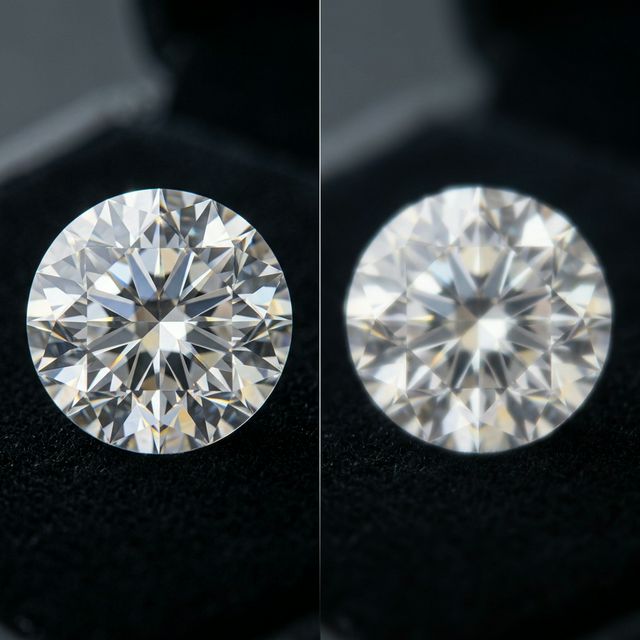
Every digital image is a battle between quality and storage. When you click "Save As," you are choosing a side in a fundamental mathematical war: **Lossy vs. Lossless**. In 2026, as 8K monitors and ultra-fast mobile networks become the norm, the way we manage this data determines whether a site feels like a premium experience or a slow, blurry relic of the past.
In this 1500+ word deep-dive, we will peel back the layers of pixels and binary code to understand the trade-offs of modern compression. We’ll show you how 3esk Converter utilizes both technologies to help you build a world-class visual presence.
1. Lossless: The Preservation of Every Single Bit
Lossless compression is the mathematician's favorite. It operates on a simple promise: **Reversibility**. If you compress a file and kemudian decompress it, every single pixel's color value is exactly the same as the original. No data is sacrificed.
The Mechanics: Lossless algorithms (like the ones in PNG, GIF, and Lossless WebP) use techniques like **Lempel-Ziv-Welch (LZW)** or **DEFLATE**. Imagine a line of 100 white pixels. Instead of saving "White, White, White..." 100 times, the algorithm saves "100x White." It's essentially a shorthand that takes zero risks with your quality.
Best For:
- Logos and Icons: Where sharp edges and flat colors must be perfect.
- Text-Heavy Screenshots: Where blurry anti-aliasing can make text unreadable.
- Professional Archiving: When you need a "Master File" that you can edit later without losing quality.
2. Lossy: The Art of the Invisible Theft
Lossy compression is more of a psychologist than a mathematician. It studies how the human eye works and identifies the data you won't miss. It then permanently deletes that data to save massive amounts of space.
The Mechanics: Lossy formats (like JPG and standard WebP) use **Quantization** and the **Discrete Cosine Transform (DCT)**. It identifies subtle color variations that the human eye is poor at distinguishing and merges them. In a photo of a blue sky, there might be 1,000 shades of blue. Lossy compression might tell the computer, "Just use 10 shades; no one will notice."
Generation Loss: One critical technical warning: Lossy compression is **cumulative**. If you take a JPG, edit it, and save it as a JPG again, you are running the compression algorithm on an already compressed file. This creates "Blocky Artifacts" and "Ringing" around sharp edges. This is why you should always use 3esk to convert directly from your high-quality source.
3. The Alpha Channel Hack: WebP's Secret Weapon
In the past, you had to choose: JPG (Small but no transparency) or PNG (Transparency but huge). In 2026, **WebP** has solved this problem with a hybrid approach. It allows you to have **Lossy content** inside a **Lossless transparency layer**. You get a beautiful transparent product photo that is 80% smaller than a PNG. This is the single biggest "tech hack" for modern e-commerce SEO.
4. Mathematical Benchmarks for 2026
| Format | Type | Typical Reduction | Risk |
|---|---|---|---|
| PNG-24 | Lossless | 5-20% | Slow Load Times |
| JPG (90%) | Lossy | 70-85% | Generation Loss |
| WebP | Hybrid | 85-95% | Old Browser Support |
"Tech Tip: When in doubt, go 'Lossless' for graphics and 'Lossy' for photography. Your 100KB PNG icon looks sharper than a 20KB JPG version, and your users will notice the difference."
5. The "Entropy" Factor: Why Some Images Don't Compress
Have you ever tried to compress a photo of a forest with millions of tiny leaves and found the file size barely changed? This is because of **High Entropy**. Formats like SVG or PNG struggle with high-entropy images. For these, lossy compression is mandatory. By using 3esk's **Smart Compression**, we identify these high-entropy areas and apply specific "Quantization Matrices" to handle the noise without blurring the overall subject.
6. Web Performance and the "First Contentful Paint"
Google's Core Web Vitals prioritize how fast a user sees the *first* part of your site.
- Lossless assets are great for your "Hero Logo" because they remain sharp as the site scales.
- Lossy assets are mandatory for "Background Textures" and "Gallery Sliders" to keep your overall page weight under the critical 2MB threshold.
7. Privacy and Local Formatting
Traditional converters often use Lossy compression to "Hide" data, but they often leave metadata intact. At 3esk.com, we recognize that privacy is part of your data strategy. Our converter allows you to maintain Lossless visual fidelity while still using "Lossy" metadata practices—stripping identifying info to keep your images safe and lean.
8. FAQ: The Decision-Maker's Guide
Q: Can I turn a Lossy image back into a Lossless one?
Technically, yes (you can save a JPG as a PNG), but it's a "Ghost Quality." You aren't actually getting the data back; you are just storing a low-quality image in a very large box. Always go back to the original file.
Q: Why does my PNG grow in size when I use a converter?
This happens if you convert a PNG-8 (256 colors) to a PNG-24 (Millions of colors). The file is "ready" for more data, even if the image doesn't need it. 3esk's **Smart Format Detection** prevents this by defaulting to the most efficient container for your source material.
Q: Is Lossless better for SEO?
Only if it doesn't slow down the site. Google doesn't care about "Bit-Perfection"; they care about **Page Speed**. A "Good enough" Lossy image that loads in 0.5s is 100x better for SEO than a "Perfect" Lossless image that takes 3s to load.
Q: How does 3esk handle batch decisions?
Our batch engine analyzes the "Complexity" of every file. If you upload a mix of icons and photos, our suggested settings will intelligently toggle between Lossless and Lossy modes to ensure everything looks professional but loads fast.
Conclusion: Quality is a Relative Term
In the world of 2026, "Highest Quality" doesn't mean the biggest file. It means the file that provides the best experience for your user. By balancing the mathematical precision of Lossless with the ruthless efficiency of Lossy, you create a website that is both a visual masterpiece and a performance powerhouse.
Don't just guess which format to use. Use the tool built on the math of the pros. Start your next project with 3esk Converter and get the balance right—every time.
Solve the Quality vs. Speed Puzzle
Master the art of compression. Use 3esk to toggle between Lossy and Lossless for the perfect web result. Free and Private.
Open 3esk Converter